By clicking “Accept All Cookies”, you agree to the storing of cookies on your device to enhance site navigation, analyze site usage and assist in our marketing efforts.
By clicking “Accept All Cookies”, you agree to the storing of cookies on your device to enhance site navigation, analyze site usage and assist in our marketing efforts.
Transforming Delimited String Columns into Rows with Snowflake
In the kingdom of data manipulation and analytics, one common challenge is dealing with data stored in delimited string format within a single column. This format poses difficulties for analysis and querying since the data is not readily accessible or organized. Snowflake, a popular cloud-based data warehousing platform, offers a powerful solution to this problem through its versatile SQL capabilities. In this article, we will explore how Snowflake enables the splitting of a delimited string column into rows, facilitating more efficient data processing and analysis.
Understanding Delimited String Columns
Delimited string columns contain multiple values separated by a specific delimiter, such as commas, pipes, or tabs. For example, consider a table employee_skills with a column skills storing skills possessed by each employee in a comma-separated format:
While this structure is convenient for storage, it complicates querying and analysis. Snowflake offers a solution to this problem through its SPLIT_TO_TABLE function, allowing us to split delimited strings into individual rows.Let’s create a table called EMPLOYEE_SKILLS and insert the above data to the table.
Here, the data for columns Employee_ID and Name inserted as is but skills column data inserted with delimiter (,).Let’s see how data is loaded to the table.select * from rt_snowflake_dev.stage.EMPLOYEE_SKILLS;
Using SPLIT_TO_TABLE in Snowflake
Snowflake's SPLIT_TO_TABLE function is specifically designed to split delimited strings into rows. It takes two arguments: the string to split and the delimiter used for splitting. Let's demonstrate how to use SPLIT_TO_TABLE to transform the skills column into individual rows.
This query splits the skills column by commas and returns each skill as a separate row, along with the corresponding employee_id and name. The TRIM(VALUE) function removes any leading or trailing whitespace from the extracted values. We have added an Audit column called ‘DW_insert_date’ to track changes. However, the addition of Audit column would be optional.
Understanding LATERAL Join
In the above SQL query, the LATERAL keyword is used before the SPLIT_TO_TABLE function. This signifies a LATERAL join, a powerful feature in SQL that allows correlated subqueries to reference columns from preceding tables in the FROM clause.In our scenario, the LATERAL join operates by executing the SPLIT_TO_TABLE function for each row of the employee_skills table. It dynamically splits the delimited string in the skills column into individual rows, providing a seamless way to expand the data.Let's demonstrate how to use SPLIT_TO_TABLE to transform the skills column into individual rows and assign a priority to each skill:
This query splits the skills column by commas and returns each skill as a separate row, along with the corresponding EMPLOYEE_ID and EMPLOYEE_NAME. Additionally, it assigns a priority to each skill within each employee using the ROW_NUMBER() window function.
Creating a New Table
To persist the transformed data, we can create a new table S_EMPLOYEE_SKILLS:
This CREATE TABLE statement selects the transformed data and inserts it into the new table S_EMPLOYEE_SKILLS. Now, the data is structured in a more accessible format, allowing for easier querying and analysis.
Aggregating Skills into Skillsets
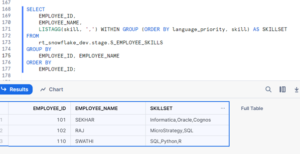
To consolidate the individual skills back into a comma-separated list for each employee, we can use the LISTAGG() function in Snowflake:
SELECT
EMPLOYEE_ID,
EMPLOYEE_NAME,
LISTAGG(skill, ',') WITHIN GROUP (ORDER BY language_priority, skill) AS SKILLSET
FROM
rt_snowflake_dev.stage.S_EMPLOYEE_SKILLS
GROUP BY
EMPLOYEE_ID, EMPLOYEE_NAME
ORDER BY
EMPLOYEE_ID;
In this query:
LISTAGG(skill, ',') WITHIN GROUP (ORDER BY language_priority, skill) concatenates the individual skills into a comma-separated list, ordered by language_priority and then by skill.
GROUP BY EMPLOYEE_ID, EMPLOYEE_NAME groups the data by employee, ensuring that each employee's skills are aggregated together.
ORDER BY EMPLOYEE_ID sorts the results by employee ID for readability.
This query produces a result where each employee's skills are combined into a single skillset, providing a concise summary of their abilities.
Practical Applications
The ability to split delimited string columns into rows opens up numerous possibilities for data analysis and manipulation. Here are some practical applications:
Skill Analysis: In the example above, splitting employee skills allows for more granular analysis. We can now easily count the occurrences of each skill, identify common skill sets, or even perform skill-based clustering.
Tagging and Categorization: Delimited string columns are commonly used for tagging or categorizing data. By splitting these tags into rows, we can analyze the distribution of tags, identify trends, and perform targeted analysis based on specific tags.
Address Parsing: In datasets containing addresses stored as delimited strings (e.g., street, city, state, zip), splitting these strings into individual components simplifies address validation, geocoding, and spatial analysis.
E-commerce Product Attributes: In an e-commerce database, product attributes like size, color, and material may be stored in a delimited string column. By splitting these attributes into rows, retailers can analyze product variations, track inventory levels more accurately, and personalize recommendations based on specific attributes.
Social Media Interactions: Social media platforms often store user interactions such as likes, comments, and shares in a delimited string column. Splitting these interactions into rows enables social media managers to analyze user engagement trends, identify popular content, and tailor marketing strategies to increase audience engagement.
Financial Transactions: Financial datasets may contain transaction details such as transaction types, categories, and amounts stored in delimited string columns. Splitting these details into rows enables financial analysts to categorize transactions accurately, detect anomalies or fraudulent activities, and generate insightful reports for stakeholders.
Healthcare Patient Records: Electronic health records (EHRs) may include patient diagnoses, medications, and treatment history stored in delimited string columns. By splitting these records into rows, healthcare providers can analyze patient histories more comprehensively, track treatment effectiveness, and identify patterns for disease management or research purposes.
Log Files Analysis: Log files from servers or applications often store metadata such as timestamps, IP addresses, and request types in delimited string columns. Splitting this information into rows allows system administrators to analyze server performance, troubleshoot issues, and enhance system security by identifying suspicious activities.
Subscription Services: Subscription-based businesses may store customer subscription plans, features, and billing details in delimited string columns. By splitting these details into rows, subscription managers can analyze customer preferences, optimize pricing strategies, and tailor subscription offerings to meet evolving customer needs.
Best Practices
When using SPLIT_TO_TABLE in Snowflake, consider the following best practices:
Normalize Data: Before splitting delimited strings, ensure that the data is properly normalized to avoid inconsistencies and errors.
Choose Delimiters Wisely: Select delimiters that are unlikely to occur within the data itself to prevent incorrect splitting.
Handle Null Values: Account for null values in delimited string columns to avoid unexpected results.
Optimize Performance: For large datasets, optimize query performance by leveraging Snowflake's clustering, partitioning, and indexing capabilities.
Conclusion
Snowflake's SPLIT_TO_TABLE function provides a powerful mechanism for splitting delimited string columns into individual rows, facilitating more flexible and efficient data analysis. By leveraging this functionality, data engineers and analysts can unlock valuable insights from delimited data, enabling better decision-making and deeper understanding of their datasets. Whether it's analyzing employee skills, parsing addresses, or categorizing data, Snowflake empowers users to conquer the challenges posed by delimited string columns with ease and efficiency.