By clicking “Accept All Cookies”, you agree to the storing of cookies on your device to enhance site navigation, analyze site usage and assist in our marketing efforts.
By clicking “Accept All Cookies”, you agree to the storing of cookies on your device to enhance site navigation, analyze site usage and assist in our marketing efforts.
Unlocking the Power of Snowflake Dynamic Tables: A Comprehensive Guide
Dynamic tables are a new declarative way of defining your data pipeline in Snowflake. It's a new kind of Snowflake table which is defined as a query to continuously and automatically materialize the result of that query as a table. Dynamic Tables can join and aggregate across multiple source objects and incrementally update results as sources change.
Dynamic Tables can also be chained together to create a DAG for more complex data pipelines, Dynamic Tables are the building blocks for continuous data pipelines. They are the easiest way to build data transformation pipelines in snowflake across batch and streaming use cases.
Dynamic Tables?
Dynamic tables represent a revolutionary method for managing data transformations within Snowflake. Unlike traditional approaches that involve creating separate target tables and coding updates, dynamic tables streamline the process by allowing you to designate the target table as dynamic. With an SQL statement defining the transformation, these tables automatically refresh the materialized results regularly, often in incremental steps, thus eliminating the need for manual intervention. This automated approach offers convenience and ensures that the target table remains synchronized with the most recent query outcomes.
How to create Dynamic Tables?
Creating Dynamic Tables in Snowflake is facilitated through the CREATE DYNAMIC TABLE command, allowing users to define the query, target lag duration, and the warehouse responsible for refreshing the table. Below is the syntax and an explanation of the parameters involved:CREATE [ OR REPLACE] DYNAMIC TABLE<name>TARGET_LAG = {'<num> {seconds | minutes | hours | days}' | DOWNSTREAM}WAREHOUSE = <warehouse_name>AS <query>The TARGET_LAG parameter sets the maximum acceptable delay between updates to the base tables and the content of the dynamic table. This can be specified in terms of seconds, minutes, hours, or days. For instance, if a 5-minute or 5-hour lag is desired, it should be indicated accordingly. The minimum allowable value is 1 minute. It's essential to note that if one dynamic table depends on another, the lag for the dependent table must be greater than or equal to the lag for the table it relies on.
Example:
CREATE OR REPLACE DATABASE MY_DB;CREATE OR REPLACE SCHEMA MY_SCHEMA;CREATE OR REPLACE TABLE EMPLOYEES(EMP_ID INT, EMP_NAME VARCHAR, EMP_ADDRESS VARCHAR);INSERT INTO EMPLOYEE VALUES(1,AMAR,LONDON);INSERT INTO EMPLOYEE VALUES(2,KIRAN,FRANCE);INSERT INTO EMPLOYEE VALUES(3,RAM,UK);INSERT INTO EMPLOYEE VALUES(4,SURYA,INDIA);SELECT * FROM EMPLOYEES;CREATE OR REPLACE TABLE EMPLOYEES_SKILL(SKILL_ID NUMBER,EMP_ID NUMBER,SKILL_NAME VARCHAR(50),SKILL_LEVEL VARCHAR(50));INSERT INTO EMPLOYEE_SKILL VALUES(1,1,'SNOWFLAKE','ADVANCE');INSERT INTO EMPLOYEE_SKILL VALUES(2,1,'PYTHON','BASIC');INSERT INTO EMPLOYEE_SKILL VALUES(3,1,'SQL','INTERMEDIATE');INSERT INTO EMPLOYEE_SKILL VALUES(1,2,'SNOWFLAKE','ADVANCE');INSERT INTO EMPLOYEE_SKILL VALUES(1,4,'SNOWFLAKE','ADVANCE');SELECT * FROM EMPLOYEES_SKILL;The given script includes the creation and population of two tables: EMPLOYEES and EMPLOYEES_SKILL. Here’s a brief description of each table:EMPLOYEES Table:Columns: EMP_ID (integer), EMP_NAME (varchar), EMP_ADDRESS (varchar)Purpose: This table stores information about employees, including their unique IDs, names, and addresses.EMPLOYEES_SKILL Table:
Purpose: This table maintains the skills and skill levels of employees. It establishes a relationship with the EMPLOYEES table through the EMP_ID column, representing the employee’s ID. Each skill entry includes a skill ID, skill name, and skill level.
Points to remember:
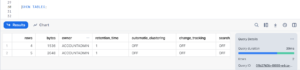
Before initiating the creation process for dynamic tables, it's imperative to grasp the significance of enabling change tracking for the associated objects. Given that dynamic tables heavily depend on monitoring alterations within the underlying database entities, enabling change tracking becomes a pivotal step.When crafting a dynamic table within Snowflake, the platform automatically endeavors to activate change tracking on the underlying objects. Nonetheless, it's crucial to acknowledge that the user initiating the dynamic table creation may lack the requisite privileges to enable change tracking on all pertinent objects. Hence, it's advisable to utilize commands like SHOW VIEW, SHOW TABLE, or similar ones to scrutinize the CHANGE_TRACKING column. This examination aids in ascertaining whether change tracking is activated for specific database objects, thereby ensuring seamless and error-free refreshments of dynamic tables.Now, we will check change tracking for the table which we have created,SHOW TABLES;
Output:
Although change tracking is currently disabled for both the Employees and Employees_Skill tables, it’s important to note that when a dynamic table is created on top of these tables, change tracking will be automatically enabled. This ensures that the dynamic table captures and reflects any modifications made to the underlying data.
Dynamic Table:
CREATE OR REPLACE DYNAMIC TABLE EMPLOYEES_DTTARGET_LAG = '1 MINUTE'WAREHOUSE = COMPUTE_WHASSELECT A.EMP_ID, A.EMP_NAME, A.EMP_ADDRESS, B. SKILL_ID, B. SKILL_NAME, B. SKILL_LEVELFROM EMPLOYEES A, EMPLOYEES_SKILL BWHERE A.EMP_ID=B.EMP_IDORDER BY B. SKILL_ID;In this scenario:
The provided code snippet exemplifies the establishment or substitution of a fluid table dubbed EMPLOYEES_DT. It draws upon the EMPLOYEES and EMPLOYEES_SKILL tables to populate this fluid table.
With a targeted lag of 1 minute, the aspiration is to keep the data within the fluid table as current as possible, trailing no more than a minute behind the source tables.
Automatically refreshed, the fluid table harnesses the computational prowess of the COMPUTE_WH warehouse.
The data within the fluid table is extracted by selecting pertinent columns from the EMPLOYEE and EMPLOYEES_SKILL tables, executing a join predicated on the EMP_ID column, and arranging the output by the SKILL_ID column.
When querying the Dynamic Table EMPLOYEE_DT immediately after its creation, you may encounter an error stating, “Dynamic Table ‘MY_DB.MY_SCHEMA.EMPLOYEES_DT’ is not initialized. Please run a manual refresh or wait for a scheduled refresh before querying.” This error occurs because the table requires a one-minute wait for the Target Lag to be completed. It is necessary to either manually refresh the table or wait until the scheduled refresh occurs before querying the data successfully.After a one-minute duration following the execution of the Dynamic table creation process,
SELECT * FROM EMPLOYEES_DT;Any Data Manipulation Language (DML) changes made to the base tables, such as EMPLOYEE or EMPLOYEES_SKILL, will be reflected in the Dynamic table within the specified latency period of 1 minute. This includes any modifications to the data itself, such as inserting, updating, or deleting records in the base tables. The Dynamic table automatically captures and reflects these changes, ensuring that it stays up to date with the latest data modifications. This real-time synchronization between the base tables and the Dynamic table allows for accurate and timely data analysis and reporting.For Example:UPDATE EMPLOYEES_SKILLSET SKILL_LEVEL = 'ADVANCED'WHERE EMP_ID = 2 AND SKILL_NAME = 'SNOWFLAKE';DELETE FROM EMPLOYEESWHERE EMP_ID = 4;After executing the above statements and waiting for a one-minute lag period, the dynamic table will be automatically updated.
In above example EMP_ID - 4 got truncated & SKILL_LEVEL for EMP_ID - 2, updated from Advance to Advanced
What are Some Use Cases for Dynamic Tables?
Real-Time Data Streaming. One scenario to utilize Snowflake Dynamic Tables is real-time data streaming. ...
Change Data Capture (CDC) Change Data Capture (CDC) is a technique used in data management to identify and capture changes in data over time. ...
Data Vault.
What are the Advantages of Using Dynamic Tables?
There are several advantages of using dynamic tables, including:
Simplicity: Dynamic tables allow users to declaratively define the result of their data pipelines using simple SQL statements. This eliminates the need to define data transformation steps as a series of tasks and then monitor dependencies and scheduling, making it easier to manage complex pipelines.
Automation: Dynamic tables materialize the results of a query that you specify. Instead of creating a separate target table and writing code to transform and update the data in that table, you can define the target table as a dynamic table, and you can specify the SQL statement that performs the transformation. An automated process updates the materialized results automatically through regular refreshes.
Cost-Effectiveness: Dynamic tables provide a reliable, cost-effective, and automated way to transform data for consumption. They eliminate the need for manual updates, saving time and effort.
Flexibility: Dynamic tables allow batch and streaming pipelines to be specified in the same way. Traditionally, the tools for batch and streaming pipelines have been distinct, and as such, data engineers have had to create and manage parallel infrastructures to leverage the benefits of batch data while still delivering low latency streaming products for real-time use cases.
Limitations
External functions.
Functions that rely on CURRENT_USER. ...
Sources that include directory tables, Iceberg tables, external tables, streams, and materialized views.
Views on dynamic tables or other unsupported objects.
User-defined functions (UDFs and UDTFs) written in SQL.
Few tips and notes about dynamic tables
Optimize your query: The query that defines a dynamic table is executed every time the table is refreshed. Therefore, it is important to optimize your query to improve performance. You can use techniques such as filtering, sorting, and aggregation to improve the performance of your query.
Monitor your tables: It is important to monitor your dynamic tables to ensure they refresh properly. You can use the Snowflake web UI or the Snowflake API to monitor the status of your tables.
Use fine-grained privileges for governance: Fine-grained privileges allow more control over who can manipulate business-critical pipelines. You can apply row-based access policies or column masking policies on dynamic tables or sources to maintain a high bar for security and governance.
Monitor your credit spend: With any kind of automated process in Snowflake, you’ll want to monitor the amount of credits it’s using. This applies to dynamic tables as well. There are built-in services that can be used to monitor costs in Snowflake and 3rd party tools like Datadog.
Conclusion
Snowflake Dynamic Tables represent a groundbreaking advancement in data engineering, fundamentally altering the approach to data transformation and management. Unlike traditional materialized views, Dynamic Tables streamlines the process by automating refresh cycles and eliminating manual updates. Through a declarative SQL-based model, users can construct data pipelines with ease, focusing on desired outcomes rather than intricate coding. This approach not only simplifies data management but also ensures near real-time access to current data, thanks to automated refreshments.The integration of Dynamic Tables with Snowflake streams further enhances their utility, enabling efficient handling of streaming data sources. This combination of features ensures the agility and responsiveness of the data pipeline, making it adept at accommodating evolving requirements. In essence, Snowflake Dynamic Tables revolutionize data engineering by automating transformations and refresh processes, providing organizations with a powerful tool to enhance decision-making, elevate data engineering workflows, and drive efficiency throughout the pipeline.