By clicking “Accept All Cookies”, you agree to the storing of cookies on your device to enhance site navigation, analyze site usage and assist in our marketing efforts.
By clicking “Accept All Cookies”, you agree to the storing of cookies on your device to enhance site navigation, analyze site usage and assist in our marketing efforts.
Part 2: End-to-End Lakeflow Job Pipeline in Databricks — From Ingestion to DAG Scheduling
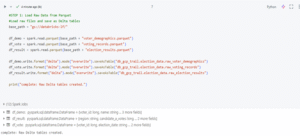
In this part, we dive into the full ETL pipeline using Databricks Lakeflow Jobs — starting from ingesting raw voter data, transforming it through silver and gold layers, and automating every task using DAG-based orchestration, scheduling, and alerts. This hands-on walkthrough shows how to build production-ready data workflows inside the Databricks Lakehouse Platform. Step 3: Ingest Raw Voter Data and Register as Delta Tables With GCS access verified, I loaded three Parquet datasets—voter_demographics, voting_records, and election_results—into Databricks and converted them into Delta tables as the bronze layer. These are stored in Unity Catalog under the election_data schema, ensuring durability, auditability, and support for downstream ETL tasks within the Lakehouse Architecture.
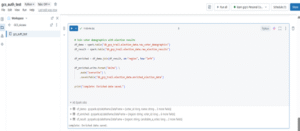
Step 4: Merge Voter and Election Info To enrich the raw data, I joined voter_demographics with election_results on the region column, combining voter profiles with regional outcomes. The result forms the silver layer—a cleaned, contextual dataset ready for deeper analysis.
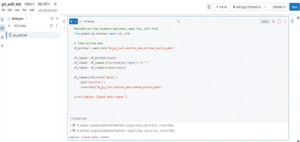
Step 5: Remove Data Noise with Cleansing and Deduplication Removed incomplete records, blank regions, and duplicates to create a refined, analysis-ready cleaned_election_datatable..
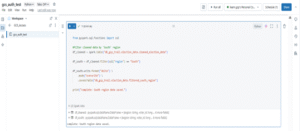
Step 6: Isolate South Region Data for Targeted Insights To focus on a specific area, I filtered the data for the South region, creating the filtered_south_region table — a lighter, targeted dataset ideal for regional analysis, reporting, or dashboards.
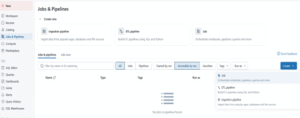
Step 7: Create a Lakeflow Job Workflow in Databricks Databricks Lakeflow Jobs organize tasks using DAG Orchestration. My ETL pipeline runs every 15 minutes with built-in dependencies and email alerts for monitoring. Open Jobs Interface in Databricks Jobs & Pipelines → Jobs → Supports DAG Orchestration for Lakeflow in Databricks.
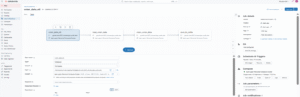
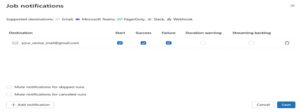
Create the Lakeflow Job in DatabricksCreated a Lakeflow Job called voter_data_etl to orchestrate the pipeline. The job runs a notebook task on a selected cluster, with email alerts set for start, success, and failure — forming the first node in the DAG.
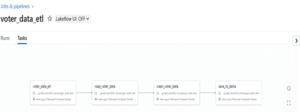
Step 8: Add Dependent Tasks to Build the DAG inside the Lakeflow Job After creating the main job, I added tasks with dependencies to follow a DAG flow — each task runs in order, triggered by the one before it. DAG structure:
voter_data_etl → root task
load_voter_data → depends on voter_data_etl
clean_voter_data → depends on load_voter_data
save_to_delta → depends on clean_voter_data
Each task is executed in a separate notebook, representing a stage in the ETL pipeline.
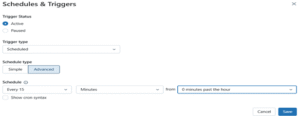
Step 9: Schedule, Email, and Monitor1.Schedule the Lakeflow Job Scheduled the Lakeflow Job to run automatically every 15 minutes, starting on the hour — ensuring consistent and timely data updates.
2.Set Up Email NotificationsI configured email alerts in the job settings to get notified on start, success, and failure — making it easy to monitor Scheduled Workflows.
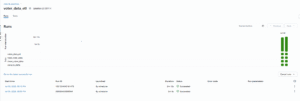
3.Monitor Scheduled Lakeflow Job RunsThe Lakeflow Job runs every 15 minutes with Real-Time Triggers, with Databricks showing real-time task statuses — Pending → Running → Succeeded — and timeline views to track execution and dependencies. Timeline view showing successful Lakeflow Job runs at 5:00 PM and 5:15 PM.
Bronze, Silver, and Gold Layers in a Lakeflow Pipeline
To keep the pipeline organized, a three-layer model is used:
Bronze (Raw Data): Ingested as-is from the source for traceability and recovery.
Silver (Cleaned Data): Joined, cleaned, and enriched for analysis.
Gold (Curated Data): Filtered and refined for reporting and decision-making — e.g., South region insights.
Each layer builds on the previous, managed through Lakeflow Job orchestration.
Lakeflow UI Availability Note
Note: DAG orchestration is available in the Lakeflow Jobs interface. However, the full visual UI with drag-and-drop features may not be supported in Community or Free Trial editions. Users can still create DAG-style jobs with dependencies and alerts using the standard interface. Full access requires a premium or enterprise-tier workspace. Why Lakeflow Jobs Matter Lakeflow Jobs represents a major step forward in how Databricks handles workflow orchestration. With DAG-style dependencies, built-in scheduling, retries, and alerting — all within a unified interface — Lakeflow makes complex pipelines easy to build, run, and monitor.Whether for ETL, machine learning, or reporting, Lakeflow Jobs offer the flexibility and automation needed for modern, production-grade data workflows.Ready to explore Lakeflow Jobs? Try building your first scheduled pipeline using Databricks Free Trial on GCP and experience streamlined orchestration firsthand.