By clicking “Accept All Cookies”, you agree to the storing of cookies on your device to enhance site navigation, analyze site usage and assist in our marketing efforts.
By clicking “Accept All Cookies”, you agree to the storing of cookies on your device to enhance site navigation, analyze site usage and assist in our marketing efforts.
End-to-End Data Pipeline on GCP with Airflow : A Social Media Case Study
Blog Part 3: Analytical Queries, BigQuery Insights & Looker Studio Visualization
Introduction
In Part 1, we set up the GCP environment, created datasets, and defined our schema for a simulated social media app. In Part 2, we built a dynamic Airflow DAG that automates the execution of SQL transformations from Cloud Storage into BigQuery.
Now in Part 3, we’ll focus on querying the transformed data in BigQuery to generate meaningful insights and visualize the final outputs using Looker Studio.
SQL Transformations Deep DiveYou can either embed your transformation logic directly in your DAG (which is easier for small projects like this blog) or organize them in modular SQL files.
Organize your transformation logic in modular SQL files like :
top_hashtags.sql
inactive_users.sql
comments_per_user.sql
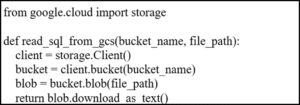
Upload them to gs://your-composer-bucket/sql/ and read them using Python's GCS client inside your DAG.
Use this approach only if you want dynamic SQL loading or plan to scale the project with many reusable queries.
Sample SQL File:
Trigger these via Airflow using BigQueryInsertJobOperator pointing to your SQL files. For this blog, I used inline SQL directly inside DAGs, which is simpler to manage.
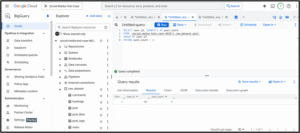
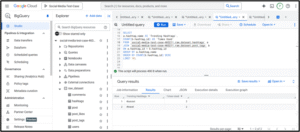
Analytical Queries and ReportingUse BigQuery to write and test queries for insights. For example:
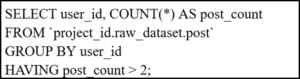
1. Users with more than 2 posts :
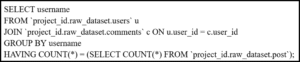
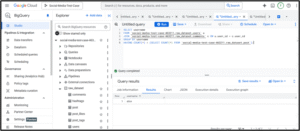
2. Users who commented on every post:
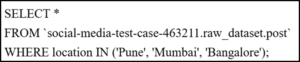
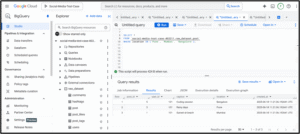
3. Location of User
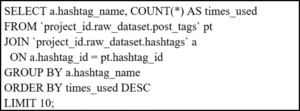
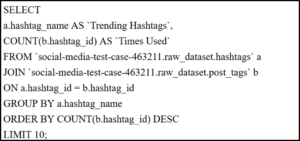
4. Most Used Hashtags
Save results in a final table using CREATE TABLE ... AS SELECT.
Visualization with Looker StudioYou can visualize final tables from BigQuery directly in Looker Studio:
Go to Looker Studio → Create New Report
Add BigQuery as data source
Choose final transformed table (e.g. top_hashtags)
Drag fields to create bar/pie/line charts
Tip: Enable auto-refresh to reflect scheduled pipeline runs
Recap of Practical Pipeline ExecutionTo summarize and reinforce the steps:
Data Modeling – Designed using BigQuery DDL with optimized PARTITION and CLUSTER strategies.
Ingestion – Started with static inserts and scaled to automated CSV loads using Python and BigQuery API.
Orchestration – DAG built using Airflow with XCom to share dynamic data across tasks.
Transformations – SQL queries modularized and triggered via BigQueryInsertJobOperator.
Analysis – Real-world queries built to explore engagement metrics, user activity, and hashtag trends.
Visualization – Final tables fed into Looker Studio for insightful dashboards.
Each step includes code and can be run directly on GCP for real-world learning or project deployment.Tip: For performance and cost optimization, always consider:
PARTITION BY created_at for time-filtering and query pruning
CLUSTER BY user_id, post_id, or other frequently filtered/joined keys
This table design serves as the foundation for ingestion, transformation, and analytics.
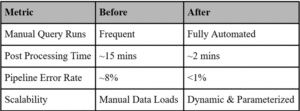
Before vs After Metrics Snapshot
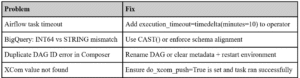
Note: These metrics are estimated based on real-world differences observed between manual BigQuery workflows and fully orchestrated Airflow pipelines. Manual workflows required frequent human intervention and were error-prone. Once moved to Airflow with automated SQL transformations and XCom validation, runtime and failure rates improved significantly.Troubleshooting Tips