By clicking “Accept All Cookies”, you agree to the storing of cookies on your device to enhance site navigation, analyze site usage and assist in our marketing efforts.
By clicking “Accept All Cookies”, you agree to the storing of cookies on your device to enhance site navigation, analyze site usage and assist in our marketing efforts.
Building a Data Quality Management System with Streamlit and Snowflake ,Groq AI
IntroductionIn this blog, we’ll explore how to build a Data Quality Management System (DQMS) that combines the simplicity of Streamlit, the power of Snowflake DMFs, and the intelligence of Generative AI. This system empowers teams to monitor, validate, and maintain high-quality data without writing complex SQL queries.We’ll start by laying the foundation of the system: setting up your environment, connecting Streamlit to Snowflake, and diving into the core components like DMFs and AI-driven rule generation. You’ll see how to prepare datasets and leverage these tools to automate data quality checks, so that by the end, your environment is fully configured for seamless monitoring and validation.Key Features of the System
No-Code Interface: Streamlit provides a simple web app where users can select tables, columns, and rules.
Native Snowflake DMFs: Apply built-in Data Management Functions (DMFs) for detecting nulls, duplicates, and more.
AI-Powered Rule Generation (Groq AI):Convert plain-English data quality rules into SQL automatically using Groq AI.
Custom DMFs: Create additional DMFs if specific checks are not supported natively.
Why a No-Code Approach MattersData quality monitoring involves tasks like:
Detecting missing or null values.
Identifying duplicate entries.
Validating business rules.
Scheduling regular audits.
A No-Code DQMS reduces dependency on manual SQL development, accelerates data monitoring, and ensures consistent results across teams.What Are DMFs in Snowflake?In Snowflake, DMFs (Data Management Functions) are built-in functions designed to simplify data quality and integrity checks. They allow users to quickly assess the health of their data without writing complex SQL queries from scratch. Think of DMFs as pre-packaged data quality validators built right into the Snowflake platform.Components Used:1.Streamlit
Serves as the interactive front-end for the DQMS.
Provides a no-code web interface for users to select tables, columns, and define data quality rules.
Dynamically displays detected columns and real-time results in tables, charts, or dashboards.
Offers buttons for applying native DMFs or AI-powered custom DMFs.
Makes the system accessible to non-technical users, allowing them to manage data quality without writing SQL.
2.Snowflake DMFs (Data Management Functions)
Acts as the core engine for automated data quality checks.
Functionality:
NULL_COUNT: Detects missing or null values in a column.
DISTINCT_COUNT: Identifies unique values to highlight anomalies or inconsistencies.
DUPLICATES: Finds duplicate records to ensure data integrity.
Custom DMFs: Supports extending native checks for rules that are unique to your business.
Enable fast, reliable, and native data quality checks within Snowflake, forming the backbone of automated monitoring.
3.Generative AI (GenAI via Groq API)
Converts plain-English data quality rules into executable SQL or custom DMFs using the Groq API.
Interprets natural language rules, e.g., “Count rows where CUSTOMERID is null.”
Sends the rule to the Groq API and generates SQL queries automatically.
Automates the creation of AI-powered custom DMFs for rules that native Snowflake DMFs cannot handle.
Reduces manual SQL work and ensures accurate, consistent checks.
Note: Users can integrate any AI model, but this example uses Groq AI for rule-to-SQL conversion.4.Snowflake Database
Acts as the central repository and execution engine for all data quality operations.
Stores tables and schemas to be monitored.
Executes both native DMFs and AI-generated SQL queries.
Maintains results that can be visualized through the Streamlit dashboard.
Provides scalability, reliability, and native DMF support, ensuring robust and continuous data quality monitoring.
Architecture OverviewThe architecture behind this Data Quality Management System blends Streamlit, Snowflake, and Generative AI into a cohesive validation pipeline. Streamlit acts as the interactive gateway, allowing users to browse tables, define quality rules, and trigger checks from a unified interface. Behind the scenes, it coordinates two powerful engines: Snowflake’s native Data Metric Functions for standardized profiling tasks and the Groq AI module for translating natural-language rules into executable SQL. This design lets users express the intent of a data check clearly and rely on the system to handle the translation, execution, and result of retrieval.
All results and audit logs are stored in Snowflake, creating a complete, automated data-quality ecosystem that’s transparent, scalable, and code-free.Setting Up Your EnvironmentGet your environment ready before building the DQMS:
Tools: Python 3.x, Streamlit, Snowflake (DMF access), Generative AI API (Groq/OpenAI), VS Code.
With these tools and packages installed, your environment is ready to start building the DQMS.
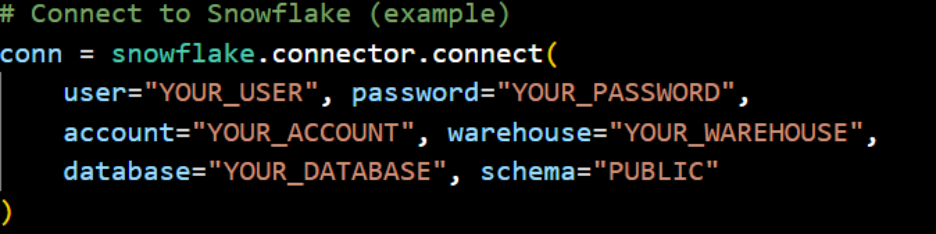
Connecting Streamlit to SnowflakeAfter the environment setup is complete. The next step is to link your Streamlit app with Snowflake. This connection is the backbone of your DQMS, allowing it to access data and run quality checks seamlessly.
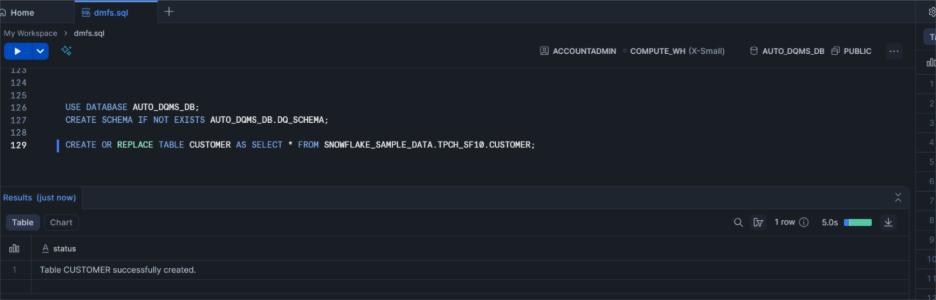
Access Snowflake tables, run native and AI-powered DMFs, and view results instantly in Streamlit for real-time data quality monitoring.Table Selection & Column DetectionAfter connecting to Snowflake, users select a table from the dropdown. The app automatically detects and displays all columns, allowing easy selection for native or AI-powered DMFs.Dataset Used:Here, public Snowflake datasets from TPCH_SF10 were used for building the data quality system. To maintain a controlled, isolated environment, these tables were copied into the working schema. This allows native and AI-powered Data Metric Functions (DMFs) to run safely without affecting the shared source data, while ensuring replicability and security.Copy TPCH SF10 Tables:CREATE OR REPLACE TABLE CUSTOMER AS SELECT * FROM SNOWFLAKE_SAMPLE_DATA.TPCH_SF10.CUSTOMER;
This setup ensures all tables are ready for automated data quality checks, making it easy to run Streamlit-based visualizations and AI-powered DMFs without touching the original shared datasets.